How Report URI saved Report URI: an XSS CVE in our own docs


Just last week, Dependabot alerted us to CVE-2026-73295, a DOM-based XSS in Material for MkDocs, the theme behind docs.report-uri.com. Dependabot opened the bump for us overnight, so it was a simple enough fix, but I was curious what the impact was.
It turns out that this was a genuine DOM XSS vulnerability in our documentation site, but our CSP prevented any attacker-controlled JavaScript from executing.
A simple enough bug
Material for MkDocs has an optional feature called search.suggest. As you type in the search field, it suggests the rest of the word it thinks you're searching for and suggests pages that match. To render that hint, versions 7.2.0 through 9.7.6 did this:
const words = value.split(/([\s-]+)/)

if (suggest?.length && words[words.length - 1]) {
  const last = suggest[suggest.length - 1]

  if (last.startsWith(words[words.length - 1]))
    words[words.length - 1] = last
} else {
  words.length = 0
}

return words

// ...

.subscribe(words => el.innerHTML = words
  .join("")
  .replace(/\s/g, " ")
)
words is the raw search value split on whitespace and hyphens, with the
delimiters retained. If the worker returns a suggestion that extends the final
token, that token is replaced. Crucially, when a suggestion exists but does not
extend the final token, the original input is left untouched. Either way, the
resulting string goes straight into innerHTML. Here's the fix in the patched version 9.7.7:
.subscribe(words => el.textContent = words.join(""))
The theme also reads the q URL parameter into the search box on page load, so the query is attacker-supplied via a link. The CVSS vector carries UI:R, user interaction required, and that turns out to be any single keypress just to trigger the suggestion to show up.
Writing an exploit
At the time of writing there is no public PoC for this issue, we were responding almost immediately to the notice after Dependabot opened the PR. The advisory describes the sink and doesn't provide any more information, and every other vulnerability database carries the same information, also with no PoC. Wanting to know how this worked and if it affected us, I set out to see if I could create a working PoC.
The search suggestions only render if the search worker returns something, so you have to search for something that will match a docs page, and the query it runs is stricter than the one behind the results list:
const titles = this.index.query(builder => {
  for (const clause of clauses)
    builder.term(clause.term, {
      fields: ["title"],
      presence: lunr.Query.presence.REQUIRED,
      wildcard: lunr.Query.wildcard.TRAILING
    })
})
Every non-prohibited clause passed to the suggestion query has to prefix-match a word in a page's title, or suggest comes back empty and nothing is rendered at all. A query containing <img src=x onerror=...> isn't likely to match on anything, so the payload never reaches the sink and won't fire.
There are three tricks to get you through:
-will make a term disappear. lunr treats a leading hyphen as a prohibited clause, and the suggestion query ignores those. So the payload rides along in a query whose only required term is an ordinary word that does match a page title. Our docs are about CSP, socspwill do nicely./separates HTML attributes. The sink rewrites every whitespace character to , which turns<img src=x onerror=y>into a load of junk. HTML will happily take a/between attributes instead of a space, and/isn't whitespace.- A valueless
src. You can't use<img/src=x/onerror=...>because an unquoted attribute value only ends at whitespace or>, so the whole thing becomes onesrc. Givesrcno value at all and the browser creates an emptysrcattribute. The image cannot be loaded, so theerrorevent fires and invokes the error handler.
Put together on our documentation site, that gives us the following payload:
https://docs.report-uri.com/?q=csp -<img/src/onerror=alert('XSS\x20Pwnage')>
Load it, press any key in the search field to trigger the suggestion, and the browser executes JavaScript. (\x20 rather than a space, because a literal space would split the payload into a second required term and we're back to the gate. A literal double quote is treated specially by Material’s search-query transformer, splitting the payload and creating another required clause, so the suggestion query fails. Single quotes and backticks avoid that, while " survives the search pipeline and is decoded as a quote when the string is parsed as HTML.)
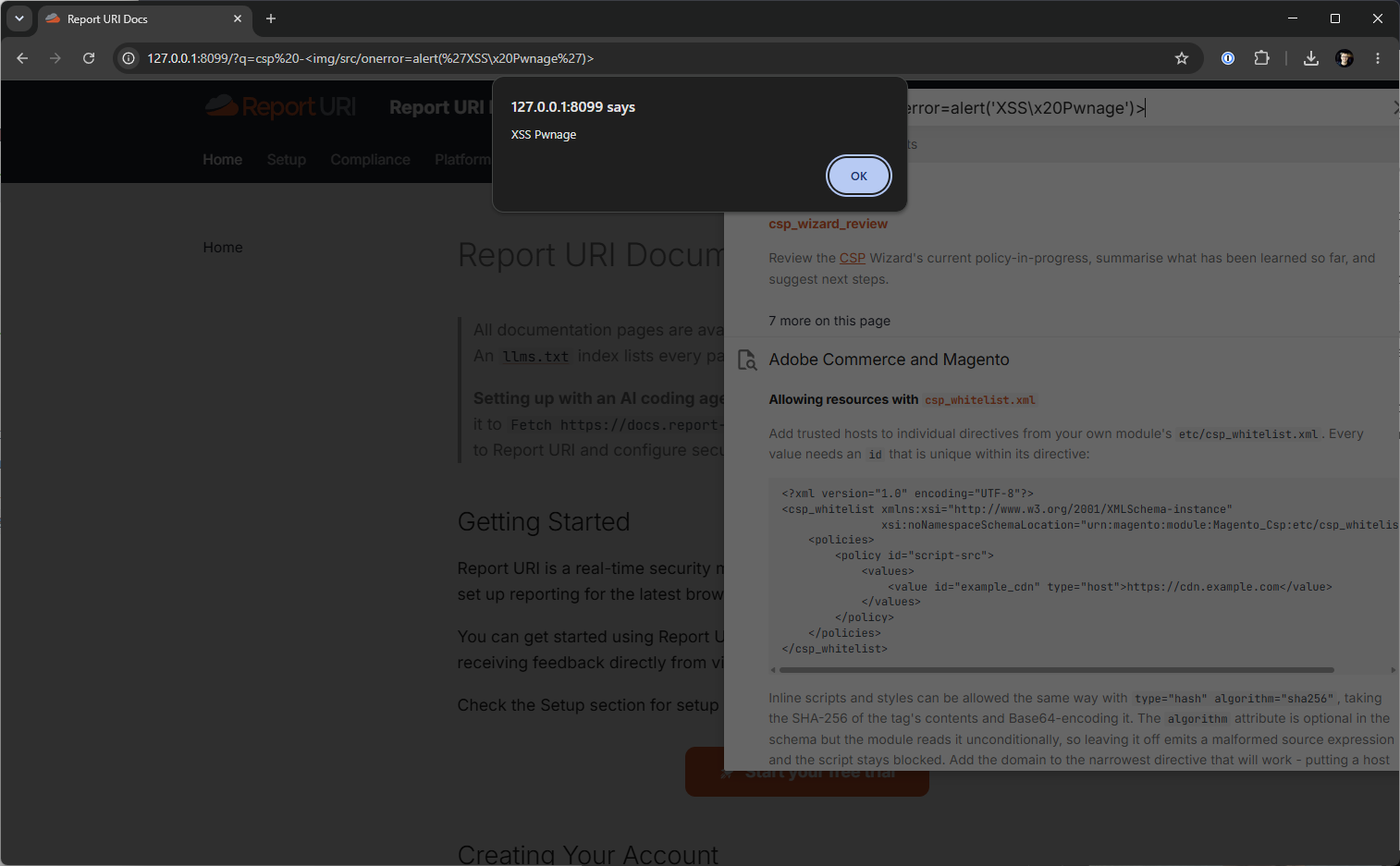
That's a real XSS vulnerability!
But then nothing happened
Here is that same payload, running against the same vulnerable version of Material for MkDocs, but now it has our standard CSP in place that we run in production.
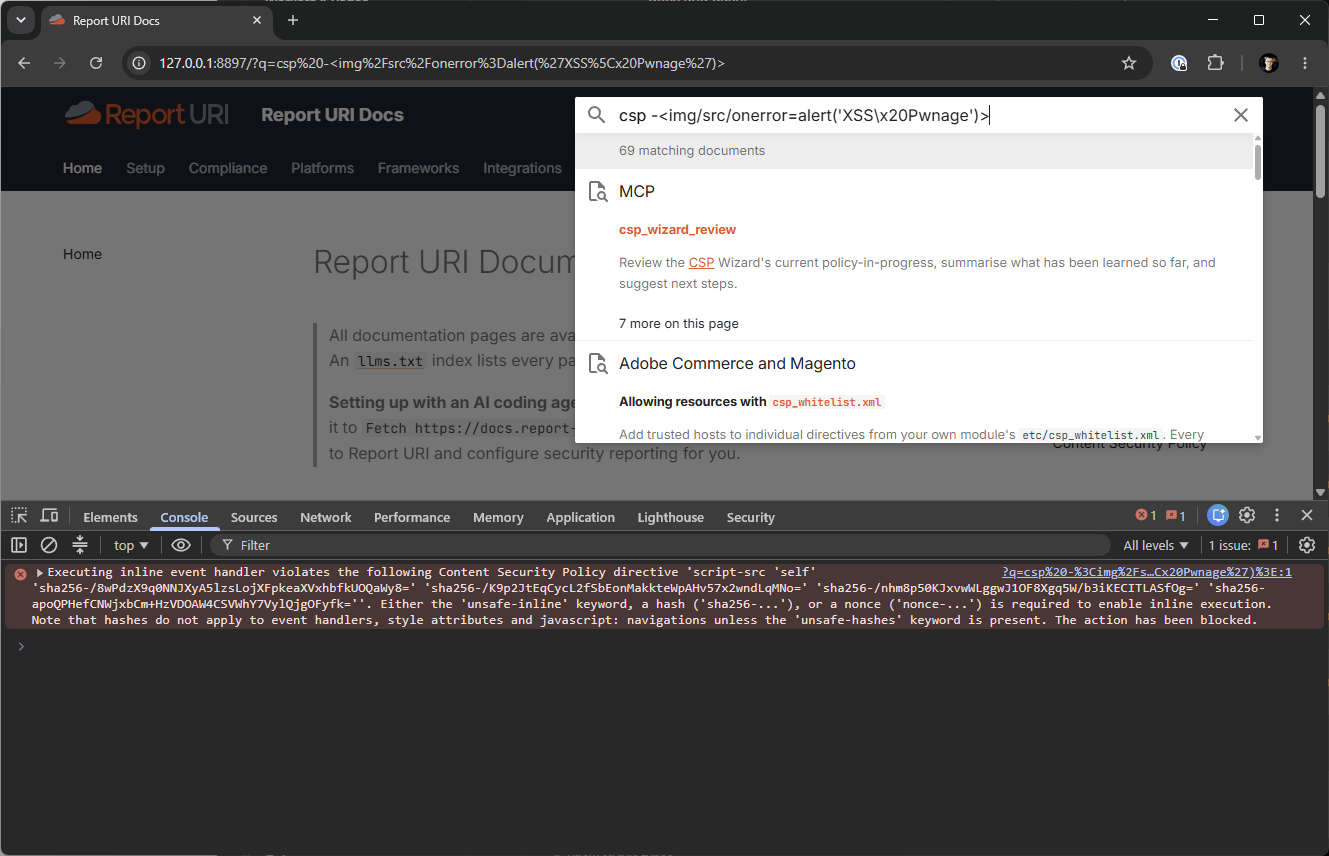
No JavaScript execution, and we got the console warning to prove it! Here's the CSP we deploy on our docs site, it's pretty simple:
Content-Security-Policy:
  default-src 'none';
  script-src 'self' 'sha256-...' 'sha256-...' 'sha256-...' 'sha256-...';
  style-src 'self' 'unsafe-inline';
  connect-src 'self';
  img-src 'self' cdn.report-uri.com data:;
  font-src 'self';
  frame-ancestors 'none';
  report-to default;
And the console error that we get:
Executing inline event handler violates the following Content Security Policy directive 'script-src 'self' 'sha256-/8wPdzX9q0NNJXyA5lzsLojXFpkeaXVxhbfkUOQaWy8=' 'sha256-/K9p2JtEqCycL2fSbEonMakkteWpAHv57x2wndLqMNo=' 'sha256-/nhm8p50KJxvwWLggwJ1OF8Xgq5W/b3iKECITLASfOg=' 'sha256-apoQPHefCNWjxbCm+HzVDOAW4CSVWhY7VylQjgOFyfk=''. Either the 'unsafe-inline' keyword, a hash ('sha256-...'), or a nonce ('nonce-...') is required to enable inline execution. Note that hashes do not apply to event handlers, style attributes and javascript: navigations unless the 'unsafe-hashes' keyword is present. The action has been blocked.No alert, no potential cookie access, and no fetch to an attacker's host as connect-src 'self' or Connection Allowlist would have stopped that too, and default-src 'none' means anything I forgot is denied by default.
That's the whole argument for CSP in one screenshot, right there: CSP blocked this XSS payload. The bug was real and the risk was real, so our exposure was real, yet the injected JavaScript did not execute.
How Report URI saved Report URI
The policy above isn't hand-written into a template, it's a hash allowlist, which is regenerated whenever the docs build changes an inline script. Material requires the use of inline scripts, and we don't allow unsafe-inline, so each of those inline scripts is allowed by its unique sha256 hash.
While writing this up I pulled the CSP reports for docs.report-uri.com and found the violation reports that had been sent as a result of me testing the XSS on production. It turns out I was the first and only person to conduct this attack against our site. Here's the screenshot of me trying to exploit the same XSS vulnerability against our live production site:
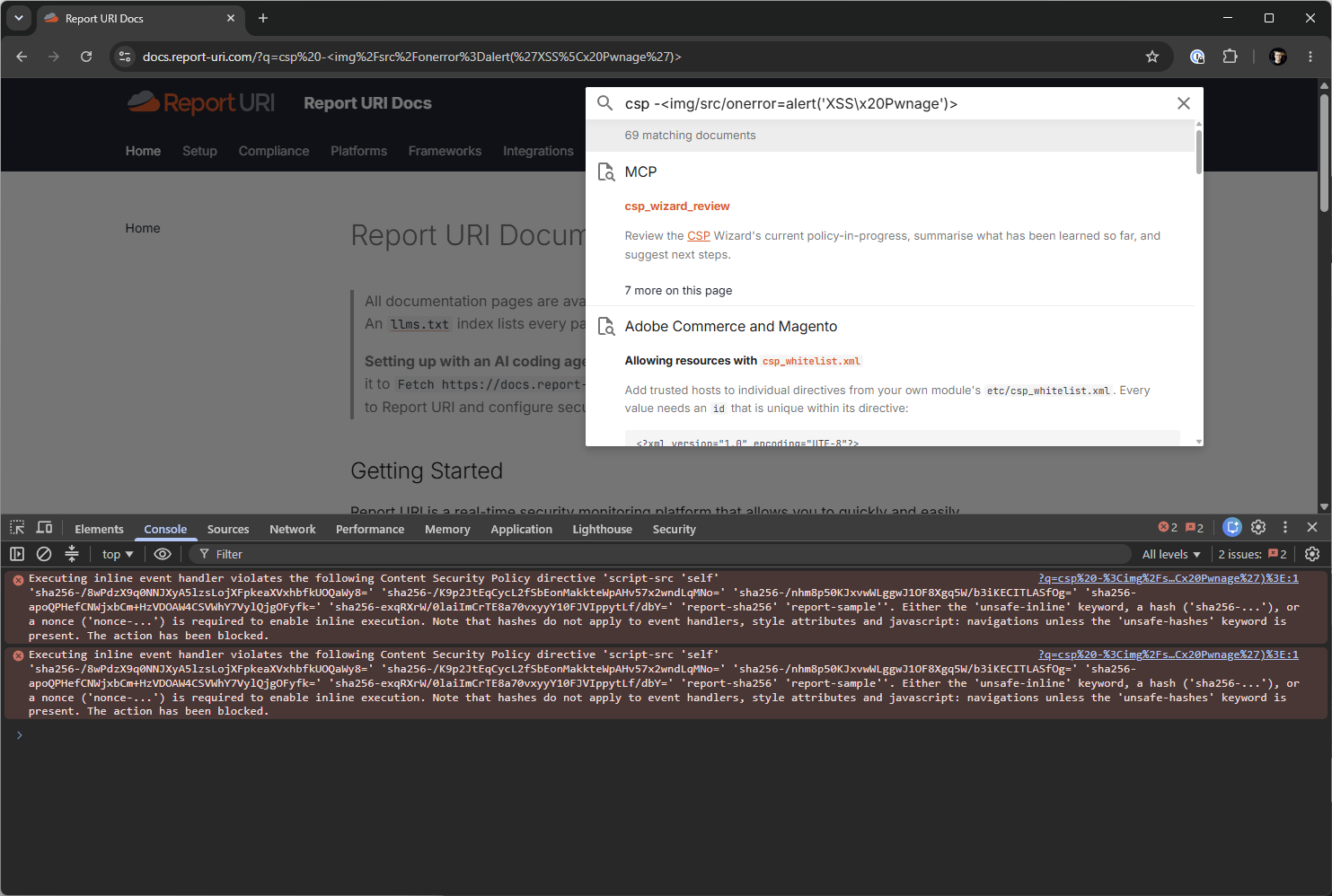
The CSP is saving us from XSS, and the reports were sent in the background so we'd have known if it was happening.
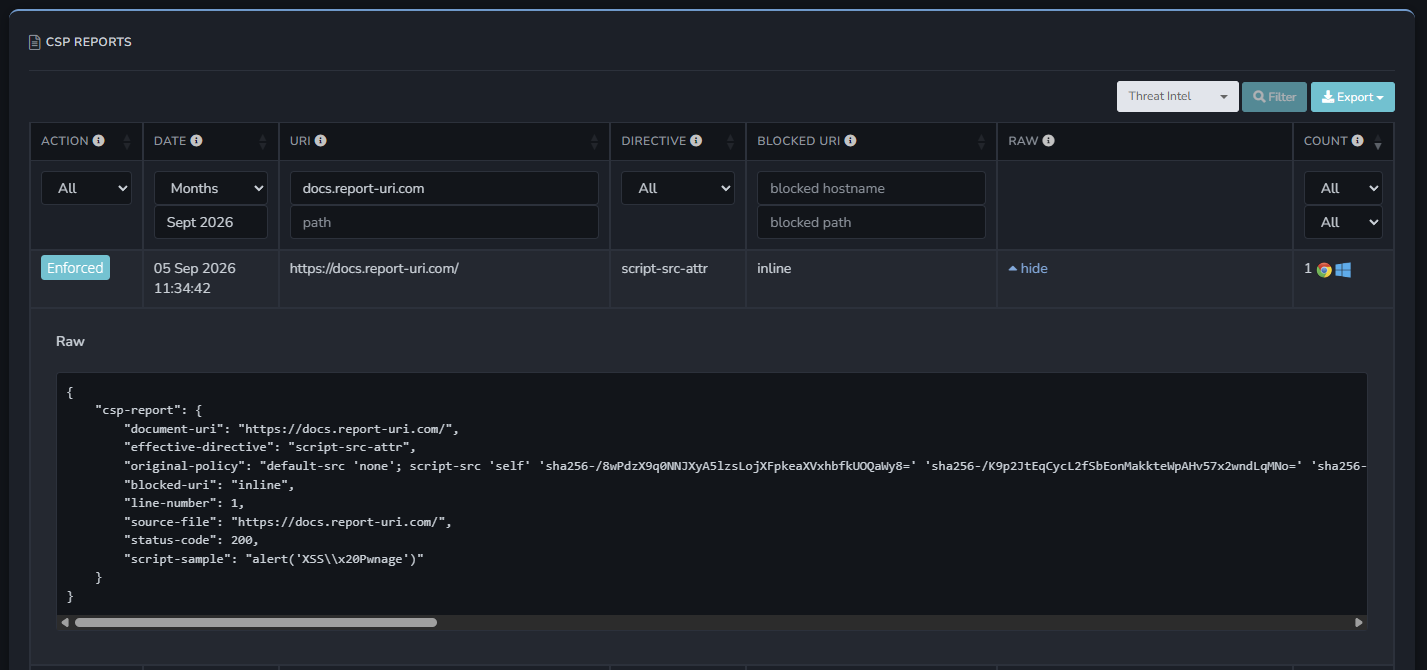
Here's the full JSON payload:
{
    "csp-report": {
        "document-uri": "https://docs.report-uri.com/",
        "effective-directive": "script-src-attr",
        "original-policy": "default-src 'none'; script-src 'self' 'sha256-...' 'sha256-...' 'sha256-...' 'sha256-...' 'report-sha256' 'report-sample'; style-src 'self' 'unsafe-inline'; connect-src 'self'; img-src 'self' cdn.report-uri.com data:; font-src 'self'; frame-ancestors *.cloudflareworkers.com *.cloudflare.com; upgrade-insecure-requests; report-uri https://helios.report-uri.com/r/t/csp/enforce; report-to default",
        "blocked-uri": "inline",
        "line-number": 1,
        "source-file": "https://docs.report-uri.com/",
        "status-code": 200,
        "script-sample": "alert('XSS\\x20Pwnage')"
    }
}
The exploit above is public now because the fix is public and shipped. If you run Material for MkDocs with search.suggest enabled, and you're on 9.7.6 or earlier, go and patch now.
Prevention, detection, evidence
The MkDocs patch did successfully fix the vulnerability, and upgrading was still essential, but until that patch reached production, our CSP prevented the vulnerable code from becoming attacker-controlled JavaScript executing in our origin.
Just as importantly, the browser didn’t just block this XSS attack silently, it sent us a violation report containing the affected page, the blocked directive and even a sample of the attempted script. Report URI turned a legitimate XSS vulnerability into a browser console warning and evidence we could search and investigate centrally.
That is the complete loop that Report URI provides:
- Prevent the attack. CSP does its job and buys you time to respond.
- Detect the attempt. Identify the problem and investigate/understand.
- Deploy the fix. Now you know, install the patched version.
It's worth being really clear here that CSP is not the solution to the problem, and nobody should look at this and think 'the XSS problem is solved' once CSP blocks it. CSP is designed to be the temporary solution between you becoming vulnerable and you deploying the permanent fix. Stopping the damage between those two points in time is still highly valuable, and if you don't have a CSP in place, you might not even become aware that your site is being exploited in the first place, so it could be present for days, weeks, or even months.
If the next dependency vulnerability lands in your production site tomorrow, there are two questions worth asking:
- Is the browser going to neutralise the attack?
- Would we even know about it?
If a vulnerable dependency lands in your production site tomorrow, will the browser prevent it from being exploited, and will your team know that someone tried?
Report URI helps you build, tune and monitor a production CSP, turning blocked attacks into evidence your team can investigate. Start a free 30-day trial with no agent, no additional JavaScript, and no credit card required.