The Skimmer That Adds a Card Form to Checkouts That Never Ask for a Card

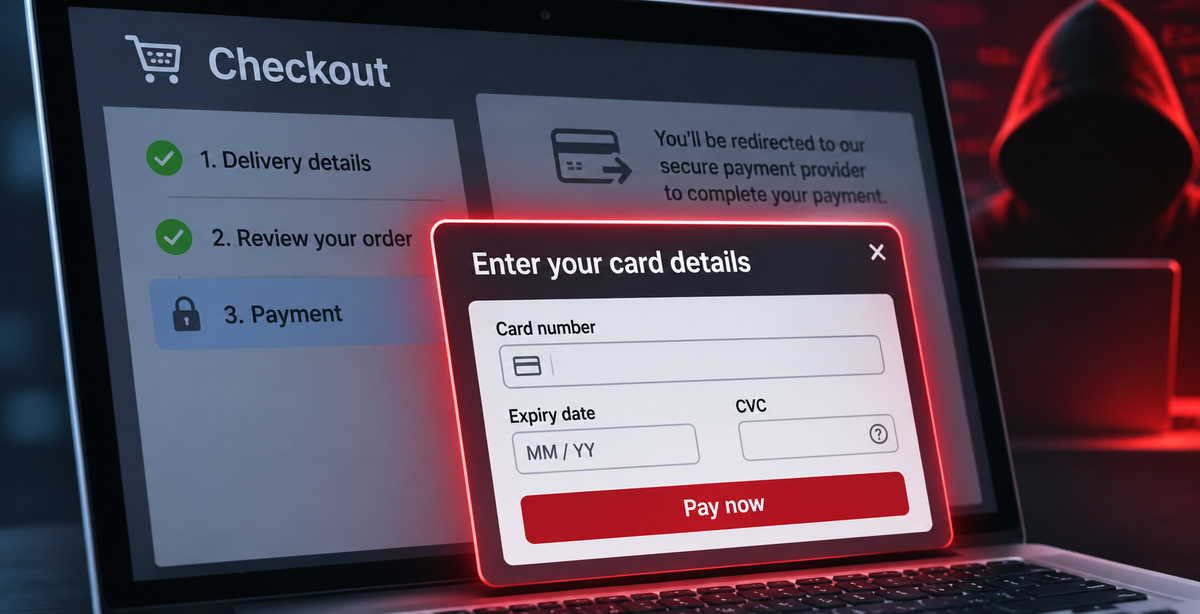
If your shop sends customers to a payment gateway to pay, or takes cash on delivery, there's a comforting thought that goes with it: card numbers never touch your website. The customer types them into Stripe, PayFast, Razorpay, or PhonePe, on someone else's page. There's nothing on your checkout for a skimmer to steal, so your customers are safe.
That's true, right up until a skimmer adds the card form itself.
This month we found a skimmer kit doing exactly that on tens of online shops across Europe, Africa and Asia. On every one of them, the payment method it attacked was one that never asks for a card number on the shop's own page. The kit adds a card form anyway, in the shop's own language and styled to match the payment brand. It takes the details, then quietly puts the real checkout back so the customer pays normally and the order goes through.
What the shopper sees
Here's a South African shop that takes payment through PayFast. Normally, choosing PayFast at checkout shows a line of text telling the customer they'll be redirected to PayFast to pay. With the skimmer on the page, that text is replaced with this:
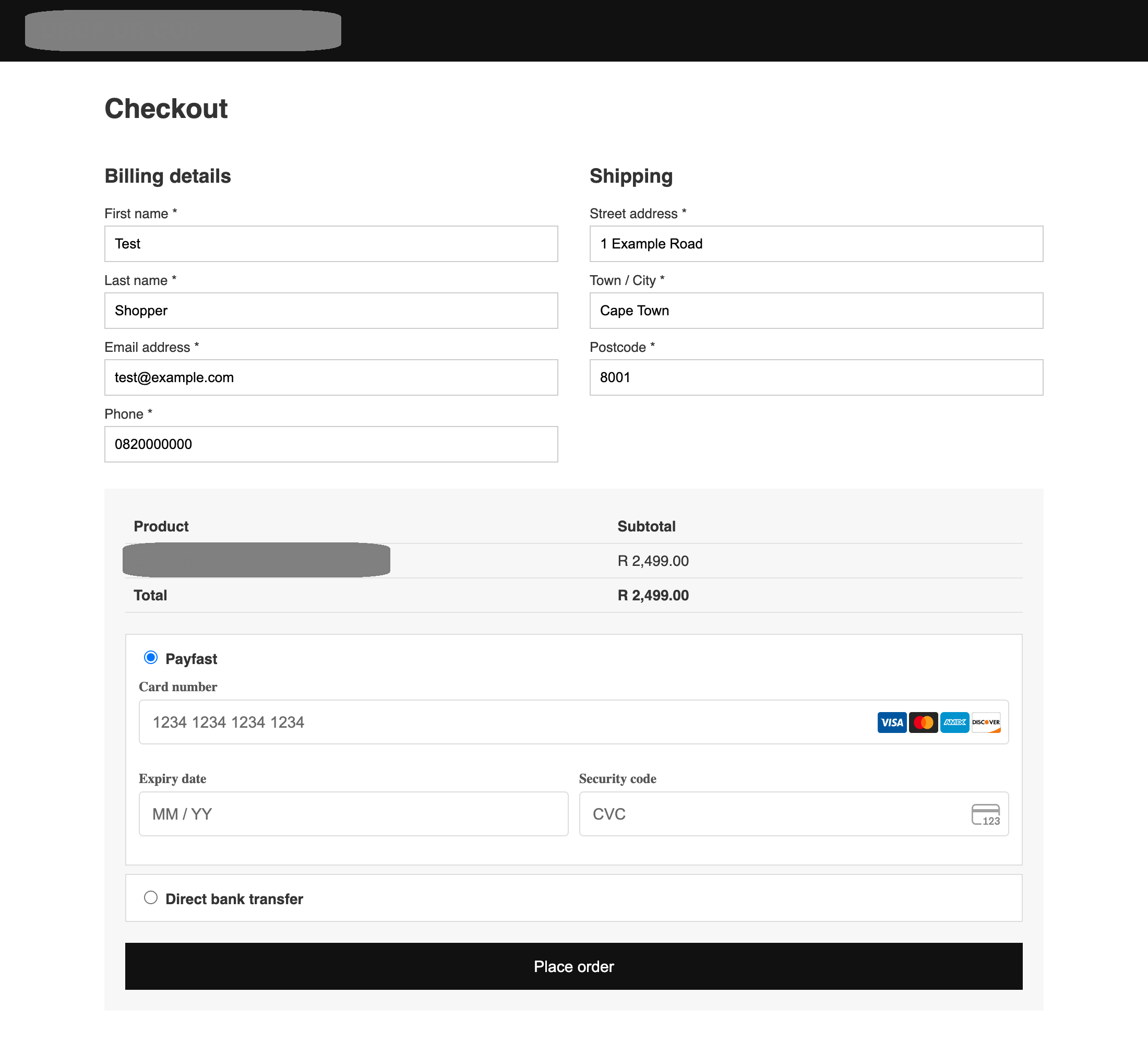
It looks like a normal card form, with the same card brand logos and the same "MM / YY" and "CVC" placeholders as a Stripe payment form. There's nothing to make a shopper suspicious, because they have no reason to know that this shop never asks for a card on this page, so the customer fills it in and clicks Place order.
Then the fake form disappears
When the customer clicks Place order, the skimmer sends everything they typed to the attacker, and then it removes its own form and puts the shop's real payment box back:
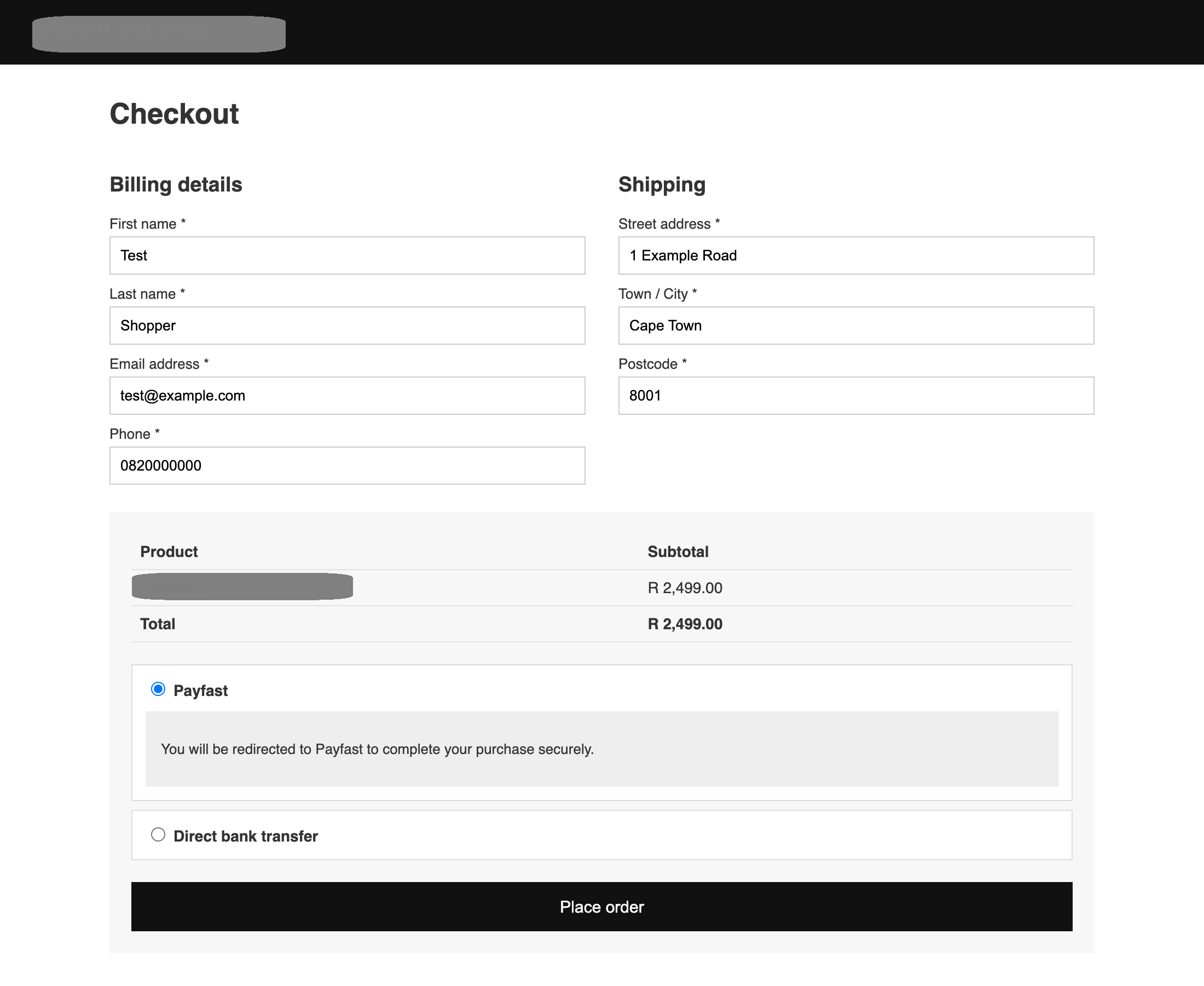
From the customer's point of view, the page hiccupped. They click Place order again, get sent to the real payment gateway, pay, and the order completes. The shop gets paid, nobody gets a failed payment, nobody calls support, and nothing about the order looks wrong. The kit also sets a flag in the browser so the fake form never shows to that customer again, even if they come back and buy something else.
What did the attacker get? Well, we captured the request the skimmer tried to send using a test card:
{
  "domain": "https://[the shop]",
  "data": {
    "billing_email": "test@example.com",
    "billing_first_name": "Test",
    "billing_last_name": "Shopper",
    "billing_address_1": "1 Example Road",
    "billing_city": "Cape Town",
    "billing_postcode": "8001",
    "billing_phone": "0820000000",
    "uagent": "Mozilla/5.0 (Macintosh; ...)",
    "card": "4111 1111 1111 1111",
    "exp": "12/29",
    "cvv": "123"
  }
}
That's everything needed to use the card, plus the name, address, email and phone number that make it easier to get past fraud checks.
Every shop got its own version
This isn't one script copied onto many sites either, each shop was served its own file, from a path named after the shop, with its own configuration. The configuration names the exact payment method to attack on that shop, the element on the page to replace, and the button that triggers the theft. Here's the config of it for the PayFast shop:
{
  keywords: ["checkout"],
  injectionMethods: [{
    triggers: [{ type: "selector",
      value: 'input[name="payment_method"][value="payfast"]:checked' }],
    targetSelector: ".payment_box.payment_method_payfast",
    insertMode: "replace-simple",
    ...
  }],
  triggerType: "button",
  buttonSelector: "#place_order",
  excludeAdmins: true,
  ...
}
Across all of the shops, the payment methods it was configured to replace were:
- PayFast, a redirect gateway in South Africa
- PhonePe and Razorpay, redirect gateways in India
- NETOPIA (mobilPay), a redirect gateway in Romania
- Cash on delivery, in Vietnam and Pakistan
- Card and redirect payment options on PrestaShop and Magento shops in Spain, Lithuania, France and Thailand
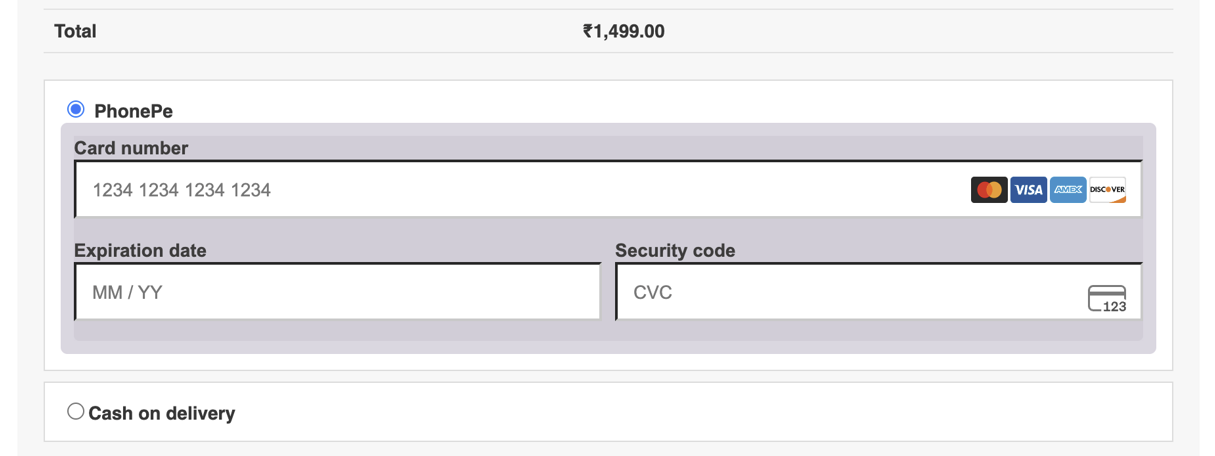
The form is translated for each shop: Vietnamese, Spanish, Romanian and Lithuanian labels in the versions we rendered. On an Indian shop using PhonePe, the fake form was styled in PhonePe's purple. On a French shop, it carried a "Transaction secured by" badge with the name of a real French payment provider:
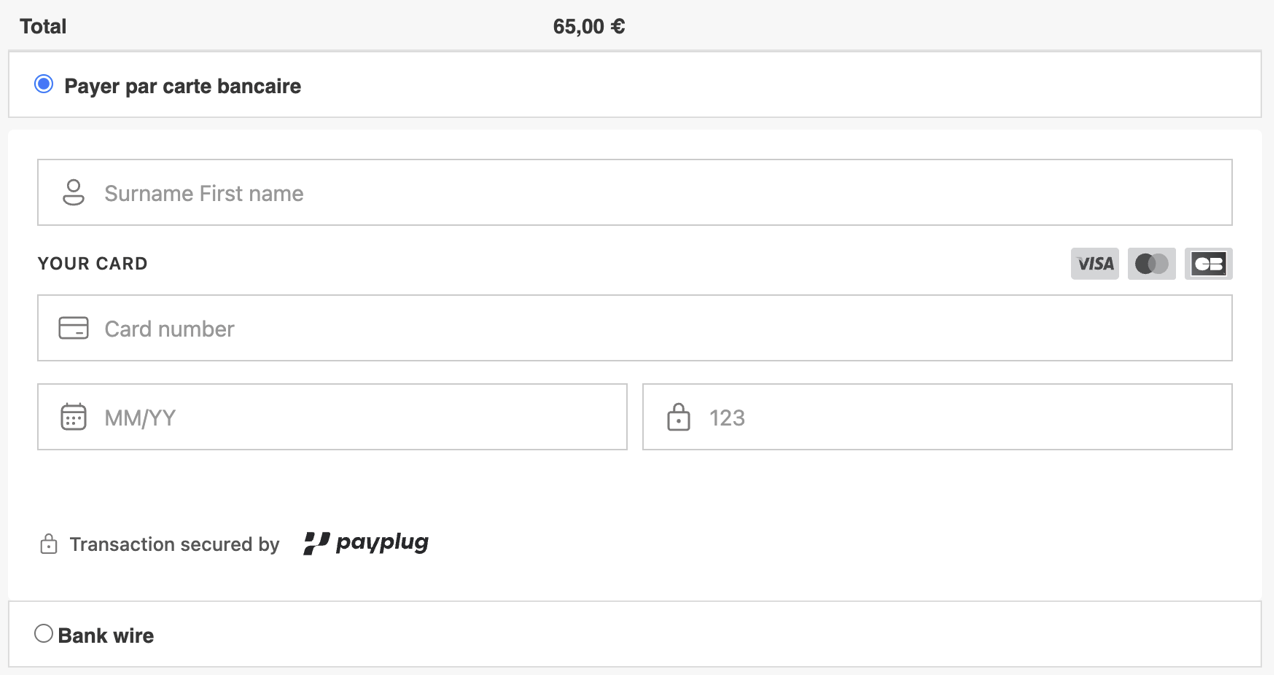
On two shops it targeted cash on delivery, which is about as far from "card data on our page" as checkout gets. One version waits for the shopper to choose cash on delivery, then replaces the entire list of payment methods with a card form:
Two of the configurations even target the page by its full element path, copied from the live checkout, which tells you someone inspected each shop's real checkout and built its config to fit.
What's interesting here is that the attacker doesn't need to find a payment form to skim, they're creating one where none should exist. It doesn't matter whether the shop uses an external payment gateway or even accepts cash on delivery. If an attacker can control what the shopper sees at checkout, they can convince them to enter card details that the legitimate shop would never have requested.
A product, not a one-off
The configuration is clearly the output of a builder: a panel where the operator fills in a form for each victim and gets a script back. Most of the options were switched off on the shops we saw, but they tell you what the kit can do:
- Several ways to send the data: a plain request, a beacon, an image pixel, a WebSocket, or a relay through a PHP script on another host. If one is blocked, it tries the next.
- Excluding admins, so the shop owner browsing their own site while logged in doesn't see the fake form.
- Developer tools detection, to stop running if someone opens the browser's developer tools to look.
- A "CSP bypass" option, with a proxy and return URL, aimed at shops that do have a policy.
- Fields for fake transaction IDs, dates and order numbers, for building convincing receipts or confirmation messages.
The files were named to look like routine site code: metrics.js, logger.bundle.js, runtime.module.js, vendor.validator.min.js, analytics_z54sl.js. In a list of scripts on a checkout page, none of them would really stand out.
The infrastructure moves on its own
The hosts serving the skimmer follow a naming pattern we already track: the word "style" glued to a random word (stylecladis.com, stylebenjamin.com, styledontcryyy.com and others), plus compound names like mildrocket.com and willowtransit.com. They belong to a campaign we've written about before, where the injected loader reads the address of the next stage out of a blockchain smart contract instead of having it written into the page. Several of the shops loaded a blockchain library and queried a blockchain endpoint alongside the skimmer, which fits.
If the address lives in a contract, the attacker can move every infected shop to a new host with one transaction, without touching any of the shops again. Taking down one host doesn't fix anything for long, the injection on the shop has to be found and removed.
One more detail stood out to us too. On one shop, the skimmer wasn't being served from the attacker's host at all, the shop's own page-speed optimisation service had cached a copy, and was serving it from the shop's CDN.
"But we don't take cards on our site"
The reasoning that card data never touches your page assumes that your page only shows what you put on it, and a skimmer breaks that assumption. Once someone can run a script on your checkout, they decide what your checkout shows, and that includes a card form you never put there. The card number still gets typed into your website, under your domain, and it's still your customers' cards that get stolen.
It's also why this kind of attack is hard to spot from the inside, because your own files don't change. Your server never receives the card number and your payment provider sees normal, successful payments. Even the customer is unlikely to notice anything. The only place the attack is visible is in the browser, on your checkout page, while it's happening.
What stops it
The good news is that each step of this attack needs the browser to do something you can control.
The script has to load. A Content Security Policy on your checkout with a script-src allowlist only lets scripts from the sources you've listed run. The skimmer is served from a host you never listed, so the browser refuses to load it, and the fake form never appears.
The data has to leave. Every way the kit has of sending data is a request to a host you never listed. A plain request or a WebSocket falls under connect-src, and an image pixel under img-src. A tight policy for those blocks the theft even if a script does get onto the page.
And you get told. Every one of those blocked attempts is a violation report sent to you. A new script source on your checkout, or a new destination your checkout is trying to send data to, is exactly the signal you want, and it arrives as soon as the first customer loads the page, not when the first chargeback comes in.
In Report URI, those reports feed:
- Script Watch, which alerts you when a script source appears on your site that has never been seen before.
- Data Watch, which alerts you when your pages start sending data to a new destination.
- Threat Intelligence, which flags reports involving known-bad hosts. All of the hosts from this kit are now in our indicator-of-compromise feed.
It's easy to get started with Report URI and our 30-day trial requires no credit card and no commitment.
What to do this week
- Look at your checkout as your customer sees it, logged out, in a private window, with each payment method selected in turn. If a payment method that should redirect you shows card fields, stop and investigate.
- Deploy a report-only Content Security Policy on your checkout pages. There is no risk and it immediately shows you every script and destination involved in taking an order.
- Turn on alerts for new scripts and new destinations on those pages, so the first appearance of something like this reaches you the same day.
- Move to an enforced policy for scripts and connections once you know what your checkout needs.